Watch the 2-minute walkthrough — build the case, bill the case, you approve
For distributors and reps who build a case, bring the tray, and bill it after
The problem

Three jobs nobody pays you for.

The scheduler emails the case. You rebuild it by hand in your warehouse system, scrolling a list of every tray you carry to find the ones this surgeon actually uses. After the case, you type every part number off a paper sheet so the hospital gets billed and the warehouse restocks. Five to ten minutes a case, twice a case, every case.

Sales Sherpa Advanced reads the email, drafts the order from what the surgeon used last time, and turns the inventory sheet into a bill. You approve. That's it.

Building the case

The email says "Dr. Keller, midfoot fusion, Trevia screws." Your system shows you 200 trays. You pick from memory. Sherpa shows the four he used last time, with the history to prove it.

Billing the case

A paper sheet with tally marks. Six-digit part numbers typed one at a time. Photograph it. Sherpa reads the marks and gives you the list to paste.

Knowing what the surgeon uses

It lives in one rep's head. Go on vacation, or leave, and it's gone. Sherpa learns it from your sales orders and keeps it with the surgeon.

The solution

Upload your files. Approve the orders.

Drop in your schedule, your order history and your catalog. Advanced reads them and writes an order for every case, based on what that surgeon used last time. Every line shows which file it came from. You check it, change what you want, and approve. The warehouse gets a PDF or CSV.

  • Any file, any format. Schedules, order history, catalogs, account lists. No templates to fill in.
  • An order for every case, from your own history. Tap any line to see the file and row it came from.
  • Nothing goes out until you approve it. Change a line and the approval resets.
  • Ask about your files. Plain-English questions about anything you uploaded, answered with the file and page.
PDFWordExcelCSV / TSVTextScans & photos

A separate product from Sales Sherpa, from $74.99/month. Your files stay in your own private workspace. It doesn't track stock and it doesn't give clinical advice.
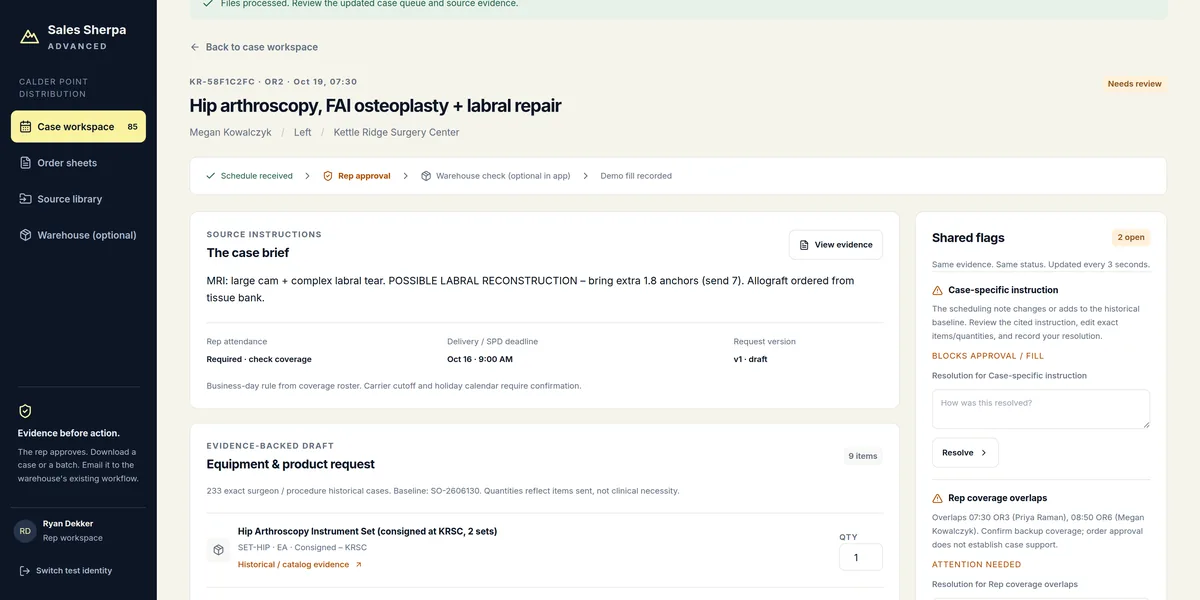
A case request in Sales Sherpa Advanced: scheduled procedure, product lines with quantities, and the evidence behind each line
How it works

Three steps.

Upload the files you already have. Advanced does the rest.

1

Upload your files

OR schedules, order history, product catalogs, account lists. Any format, as many as you like. Upload the same file twice and it's skipped. Upload a newer version and it replaces the old one.

2

Check what was read

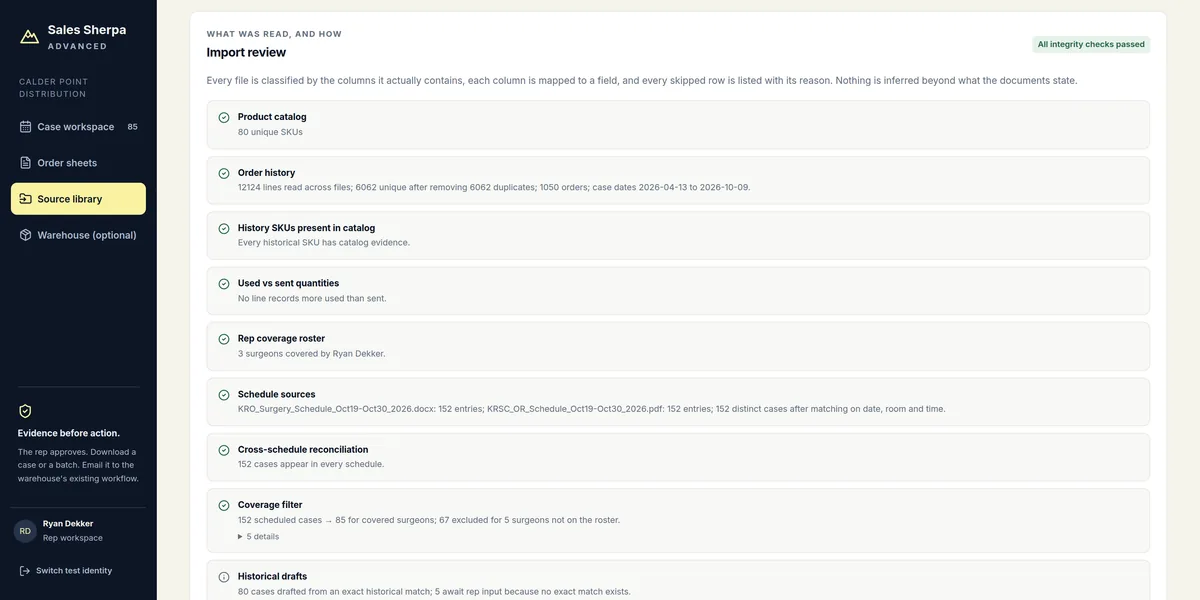
Advanced shows what it found in each file: the dates, rooms, surgeons and products. If it can't read a spreadsheet, it tells you instead of guessing.

3

Approve and send

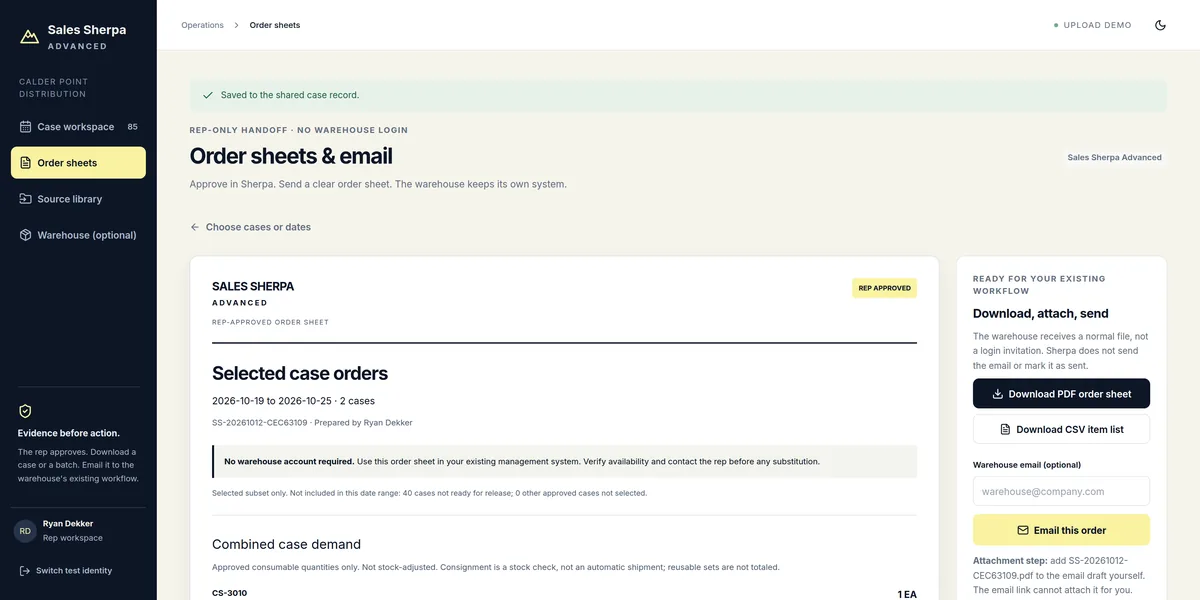
Every case gets an order drafted from what that surgeon used last time. Change the quantities if you need to, then approve. Download the order sheet for the day or the week as a PDF or CSV, or copy the email.

Import review listing each uploaded file, the tables found inside and how columns were mapped
What was read: from which file, and what each column means.
Order sheet builder with the week's approved cases selected and PDF, CSV and email options
Order sheet: your approved cases, as a PDF, CSV or email.
Accuracy

It never guesses.

Advanced never makes up a quantity, a product or a case. Everything on the screen comes from a file you uploaded, and it shows you which one.

Every line shows its source

Tap any product line and see the file and the row it came from: the order history, the catalog, the schedule.

If it can't read a file, it says so

A spreadsheet it doesn't understand is turned away, with the column names it found, so you can fix the file. No silent gaps.

Holds, not guesses

A cancelled case, a surgeon you don't cover, or a case with no history gets a hold. Nothing on hold can be approved or sent.

Change it, approve it again

Change a quantity or replace a file and the approval clears. A stale case never makes it onto the order sheet.

Ask

Questions about your files, answered from your files.

The same Ask that Sales Sherpa reps use, pointed at everything you import into Advanced: order history, catalogs, schedules, IFUs. Type the question the way you'd say it in the hallway.

What you can ask

"What did Dr. Raman use for her last Lapidus?" "Which lots were billed on the 19th?" "What sizes does the CS-7135 come in?" Anything that's written in a file you uploaded.

Where the answer comes from

Every answer cites the file and the page. Tap it to check. Files are read into Ask automatically when you import them; remove a file and its answers go with it.

What it won't do

If the answer isn't in your files, Ask says so instead of guessing. It never changes a case, an order or a bill, and it never uses anyone else's files.

Walkthrough

See it work in two minutes.

A made-up distributor, surgeon and files. The schedule and order history go in, the case order comes out with evidence on every line, then a photographed inventory sheet becomes the bill. You approve each step.

Prefer hands-on? Open Advanced and choose "Load & process sample files" to work through the same fictional set, or download the seven sample files and upload them yourself.

Three products

Which Sales Sherpa is right for you?

Same sign-in, same privacy, three different jobs. Each is its own product with its own plan.

Sales Sherpa

Your schedule, to-dos and product answers.

For reps who want everything they get sent organized in one place, on their phone.

  • Forward or snap what you get sent; your schedule, to-dos and account info organized
  • Confirm cases into your phone calendar; conflicts flagged before they bite
  • Ask: every product answer from your own documents, with the page
  • No case building or billing. That is Advanced.

From $18.75/month on a 2-year plan · $24.99 month to month

Sales Sherpa Advanced

Build the case. Bill the case.

For distributors and reps who build a case, bring the tray, and bill it after.

  • The order for every case, drafted from what the surgeon used last time. You approve.
  • Photograph the inventory sheet after the case; get the list to paste, download or email
  • What each surgeon uses, kept with the surgeon, not in one rep's head
  • Ask: plain-English answers from your uploaded files, with the file and page
  • Sold separately from Sales Sherpa

From $56.25/month on a 2-year plan · $74.99 month to month

Sales Sherpa Hub

Who is switching, and when.

For distributor owners. Your schedulers already email the weekly OR schedule to your reps; copy one more address and see every surgeon's cases, ours versus another vendor, every Monday.

  • One forwarding address per organization; patient identifiers stripped at the door
  • Surgeons flagged when their share drops, dated, with the vendor named
  • Weekly owner report as a PDF, downloaded or emailed
  • Separate from Sales Sherpa and Advanced

Pricing by request

What you getSales SherpaSherpaYour week, organizedSales Sherpa AdvancedAdvancedBuild the case. Bill the case.Sales Sherpa HubHubFor owners
Made forThe repThe rep or distributor who builds and bills casesThe distributor owner
Organize what you get sent
Forward or snap schedules, emails, notes, account lists✓——
Schedule and to-do lists organized for you✓——
Confirm cases into your phone calendar✓——
Conflicts flagged before they bite✓——
Account info organized as you upload✓——
Ask: plain-English answers from your own uploaded files, with the file and page✓✓—
Build and bill the case
The order for every case, drafted from what the surgeon used last time—✓—
Photograph the inventory sheet; get the bill to paste, download or email—✓—
What each surgeon uses, kept with the surgeon—✓—
Order sheets for the day or week (PDF, CSV, email)—✓—
See the whole organization
Every surgeon's cases across all your reps, ours versus another vendor——✓
Surgeons flagged when their share drops, with the vendor named——✓
Weekly owner report (PDF)——✓
PriceFrom $24.99/monthFrom $74.99/monthBy request

Three separate products, sold separately. Same sign-in and the same privacy rules. Buy one, or more than one.

Pricing

Sales Sherpa Advanced. One plan, everything included.

Month to month, 1 year or 2 years. Advanced is its own subscription, separate from Sales Sherpa.

Month to month

$74.99 / month
Billed monthly
  • Unlimited source files and cases
  • Order sheets and bills as PDF, CSV or email
  • Ask: answers from your own files
  • Private per-account workspace
Get started

1 year

$62.50 / month
$749.99 billed yearly · save 16%
  • Everything in month to month
  • Locks your price for 12 months
  • One payment, no monthly charges
Get started
Best value

2 years

$56.25 / month
$1,349.99 billed every 2 years · save 25%
  • Everything in month to month
  • Locks your price for 24 months
  • Lowest monthly cost
Get started

Already have Sales Sherpa? Sign in and choose Get Advanced in Settings: switch to Advanced (you pay only the difference today; Sales Sherpa ends) or add Advanced and keep both. Cancel anytime in Settings.

Get started

Create your Sales Sherpa Advanced account.

Email, plan, pay. You're in within a minute. No password.

Plan

$74.99/month, $749.99/year (save 16%) or $1,349.99 for 2 years (save 25%). Separate from Sales Sherpa. Cancel anytime in Settings.

Already have an account? Sign in

Questions

The short answers.

Which files can I upload?

PDF, Word (.docx), Excel (.xlsx, .xls), CSV, TSV, plain text, and images or scans (PNG, JPG, TIFF). Up to 25 MB per file and 20 files per batch. Column names and layouts can differ from file to file. Older .doc and .rtf files should be saved as .docx first.

What happens with a scanned or photographed schedule?

Advanced reads the text and keeps it with the file so you can search it. A photo on its own doesn't become orders; use it alongside your schedule or order history export.

Does it place orders or contact the warehouse?

No. It makes the order sheet (PDF or CSV) and an email draft. You send it the way you do today. The warehouse needs no login.

Does it know stock levels or recommend products?

No. Orders come from your own order history and catalog for that surgeon and procedure. No inventory feeds, no clinical advice. You set the final quantities.

Is my data private?

Your files live in your own private space and are used only to build your orders. Patient columns are never copied into orders or order sheets. Delete a file and its orders are rebuilt without it; clear the workspace and everything is deleted.

How is this different from Sales Sherpa?

Sales Sherpa organizes what you get sent: your schedule, to-dos and account info, your cases in your phone calendar, conflicts flagged, and product answers from your own documents. It does not build or bill cases. Advanced does exactly that: the order for every case and the bill after it. Separate products, sold separately: get one, or both.

How does billing work?

Pick month to month ($74.99), 1 year ($749.99) or 2 years ($1,349.99) at checkout. Billing starts right away and renews until you cancel in Settings. Already pay for Sales Sherpa? Sign in and choose Get Advanced in Settings: switch to Advanced today (you pay only the difference and Sales Sherpa ends), or add Advanced and keep both.

Build the case. Bill the case.

Start with the fictional sample set tonight. Bring your own schedules tomorrow. From $74.99/month.